Chat and plan mode
Sentinel threads run in one of two modes: chat or plan.
They sit close to each other in the UI, but they do different jobs.
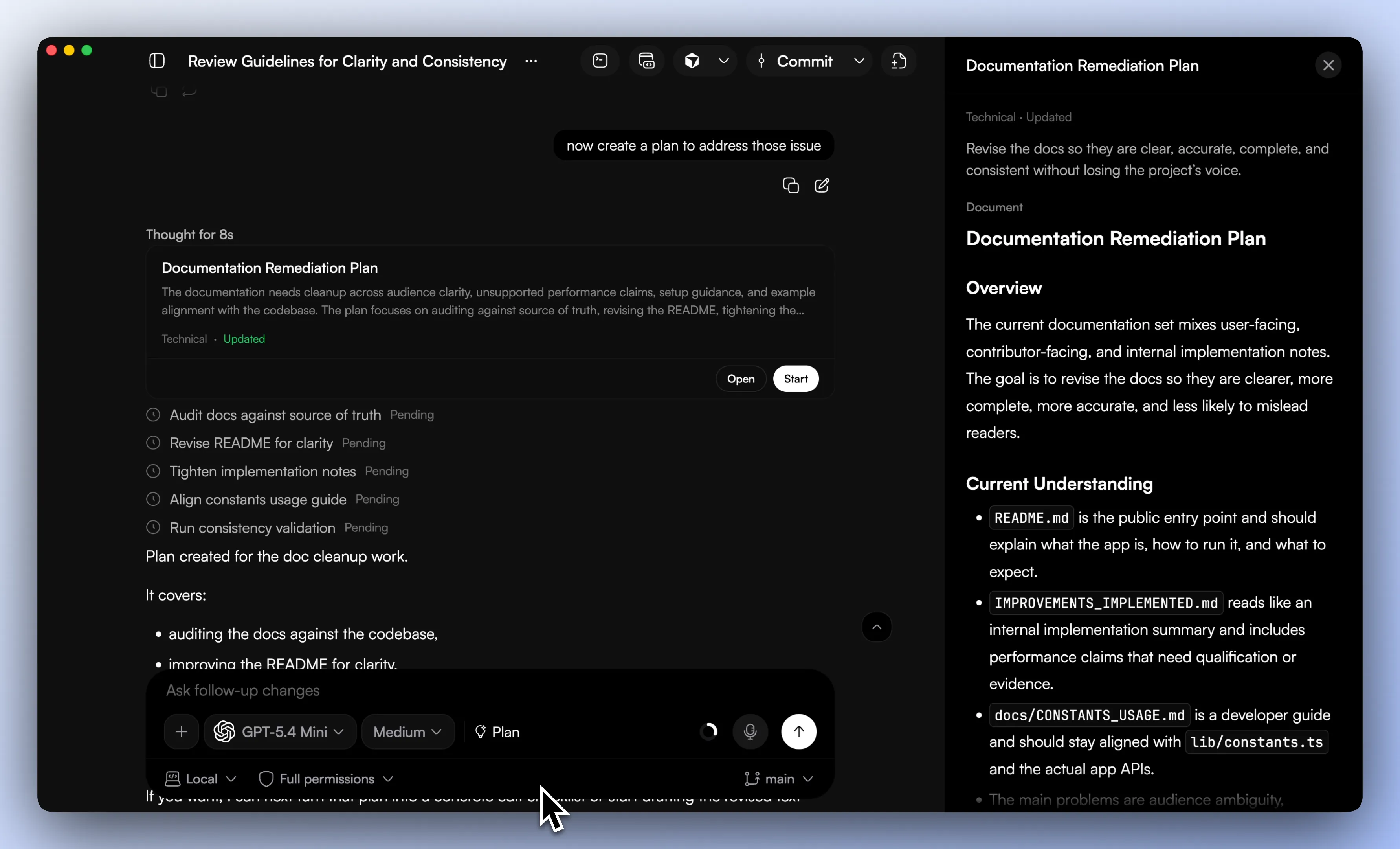
Chat mode
Chat mode is the default working mode. It is what you use when you want the model to inspect code, answer questions, make changes, run tools, or simply keep moving through a task without stopping to structure the work first.
In practice, this is where most day-to-day work happens. A chat thread can stream responses, take attachments, switch engines and models, queue follow-ups while a run is busy, stop for tool approvals, and keep a branch-aware history. The important part is that all of it stays tied to the same ongoing thread instead of being rebuilt every time you ask the next question.
Plan mode
Plan mode is built into the app as its own mode because some tasks need shape before they need execution.
When a thread is in plan mode, Sentinel stores structured state for it instead of treating the result like just another reply. That state includes the plan title, summary, goal, document body, audience, task list, and question sets that still need answers. Tasks carry status, and so do the question sets, which means the plan can stay live instead of freezing the moment it is generated.
This matters because planning work rarely happens in one pass. The first draft leaves gaps. New questions come up. Scope shifts. Some tasks get done while others stall. Plan mode gives that work somewhere to live.
When to use plan mode
Plan mode makes sense when the task needs shape before implementation. Architecture changes, bigger features, migrations, tracked subtasks, and work with unresolved questions all fit well there.
If you already know what to do and just need to move, chat mode is usually better. If the task still feels muddy and you need the system to hold onto a plan, questions, and task state over time, plan mode usually pays off.
Composer controls
The composer does more than send text. Depending on thread state and workspace state, it also handles engine and model selection, mode selection, reasoning effort, attachments, workspace file suggestions, skill suggestions, voice input, permission mode display, and draft-thread setup details like project mode or branch handling.
That can feel busy at first, but it keeps the thread controls in one place instead of scattering them across the app.

Follow-ups and long runs
If a run is active, Sentinel can queue a follow-up instead of forcing you to wait for the current run to finish and then restate the next thing. That sounds small, but it matters during longer sessions.
The thread also carries normal run state such as idle, streaming, or awaiting_approval. That status lives in the thread itself rather than in a temporary UI flag.
Good next reads
The next pages that usually help are Repo workflow and Approvals and sub-agents.